Which Technology Skill Is Best for a Complete Beginner?
Which Technology Skill Is Best for a Complete Beginner?
The best technology skill for beginners is usually practical digital problem-solving: start with digital literacy and add spreadsheet skills, basic coding, or simple automation according to your goal. This foundation is accessible, useful in everyday work, and flexible enough to lead toward data analysis, web development, cybersecurity, cloud computing, or artificial intelligence.
No single technology skill suits every learner. The right first path depends on the kind of work you enjoy, the result you want to create, the tools available to you, and whether you prefer visual design, numbers, systems, communication, or structured problem-solving. This documentary comparison draws on published guidance and professional learning resources; the skills and paths discussed here were not directly tested by the editorial team.
Quick start
🧭 Start with one practical outcome, such as a budget dashboard, a personal webpage, an automated reminder, or a safer account setup.
🧩 Digital literacy and spreadsheet basics are often the lowest-barrier entry points, while coding, web development, and automation offer more technical progression.
⏱️ Use a four-week experiment to test one path, complete a small project, and decide what to learn next from evidence rather than trends.
🔐 AI literacy and cybersecurity awareness are useful additions, but they work better when combined with sound digital judgment.
The short answer: start with practical digital problem-solving
For most complete beginners, practical digital problem-solving is the strongest starting point because it produces immediate benefits without requiring advanced mathematics or a formal technical background. Digital literacy is the ability to use devices, files, online services, communication tools, and basic troubleshooting methods safely and effectively.
The best technology skill for beginners therefore depends on the learner’s first objective. Someone who wants to become more productive at work may begin with file management, collaboration tools, presentations, spreadsheets, and simple automation. Someone who wants to build websites may prefer HTML, CSS, and basic JavaScript, while a numbers-oriented learner may move from spreadsheets toward data analysis with SQL, Python, and statistics.
The most useful first skill is the one that creates a visible result quickly and leaves room for a sensible next step. The comparison below separates beginner accessibility from professional readiness, because learning a foundation is not the same as qualifying for a specific role.
What makes a technology skill beginner-friendly?
A beginner-friendly technology skill is a learnable area that offers clear starting concepts, accessible tools, frequent practice opportunities, and a visible connection between effort and result. A skill can still become technically demanding later; the important point is that the first steps are understandable and actionable.
Entry-level learning does not require expensive software in every field. Browser-based tools, free documentation, spreadsheets, open-source programming environments, and small personal projects can provide a workable starting point. The cost and availability of specific courses or platforms vary, so check current terms before paying for a subscription.
Professional readiness requires more than recognizing terminology. Independent projects, communication, role-specific knowledge, and relevant experience may all matter, depending on the position. A first project proves that you can apply a concept; it does not guarantee employment or income.
The five criteria to compare before choosing
- Starting difficulty: how much terminology, setup, mathematics, or technical context is required at the beginning.
- First useful result: how quickly a learner can create or improve something real.
- Learning access: whether free or low-cost tools, documentation, and structured lessons are available.
- Transferability: whether the skill applies across workplaces, industries, or personal projects.
- Next-step flexibility: whether the foundation can lead toward a more specialized path.
A useful beginner skill should answer two questions at once: “What can I do with it now?” and “Where can it take me next?”
The best technology skills for beginners, compared
The options below are not ranked as universal winners. Each path solves a different type of problem, and a sensible combination can be more useful than trying to master several technologies simultaneously.
| Skill path | Good first project | Main beginner advantage | Main trade-off | Possible progression |
|---|---|---|---|---|
| Digital literacy and productivity tools | Organized shared folder or presentation | Immediate everyday usefulness | Less specialized at the start | Spreadsheets, automation, operations |
| Spreadsheet and data analysis | Budget, survey summary, or small dashboard | Clear visual results and transferable logic | Large datasets require more technical knowledge | SQL, Python, analytics, business intelligence |
| Coding fundamentals | Calculator or text-based tool | Builds structured problem-solving | Progress can feel abstract before projects become useful | Software development, scripting, automation |
| Web development | Personal profile page | Visible and motivating project output | Full applications require more than HTML and CSS | JavaScript, frameworks, front-end development |
| No-code automation | Form response or reminder workflow | Reduces repetitive tasks without extensive programming | Platform-specific limits and changing interfaces | Process design, scripting, operations |
| Artificial intelligence literacy | Verified document summary workflow | Develops practical and critical tool use | Outputs require fact-checking and privacy awareness | Workflow design, data, automation, subject expertise |
Digital literacy and productivity tools
Digital literacy covers file management, online collaboration, presentations, email, video conferencing, search, basic troubleshooting, and safe account practices. This path suits learners who want immediate improvements in work, study, or personal organization rather than an intensely technical specialization.
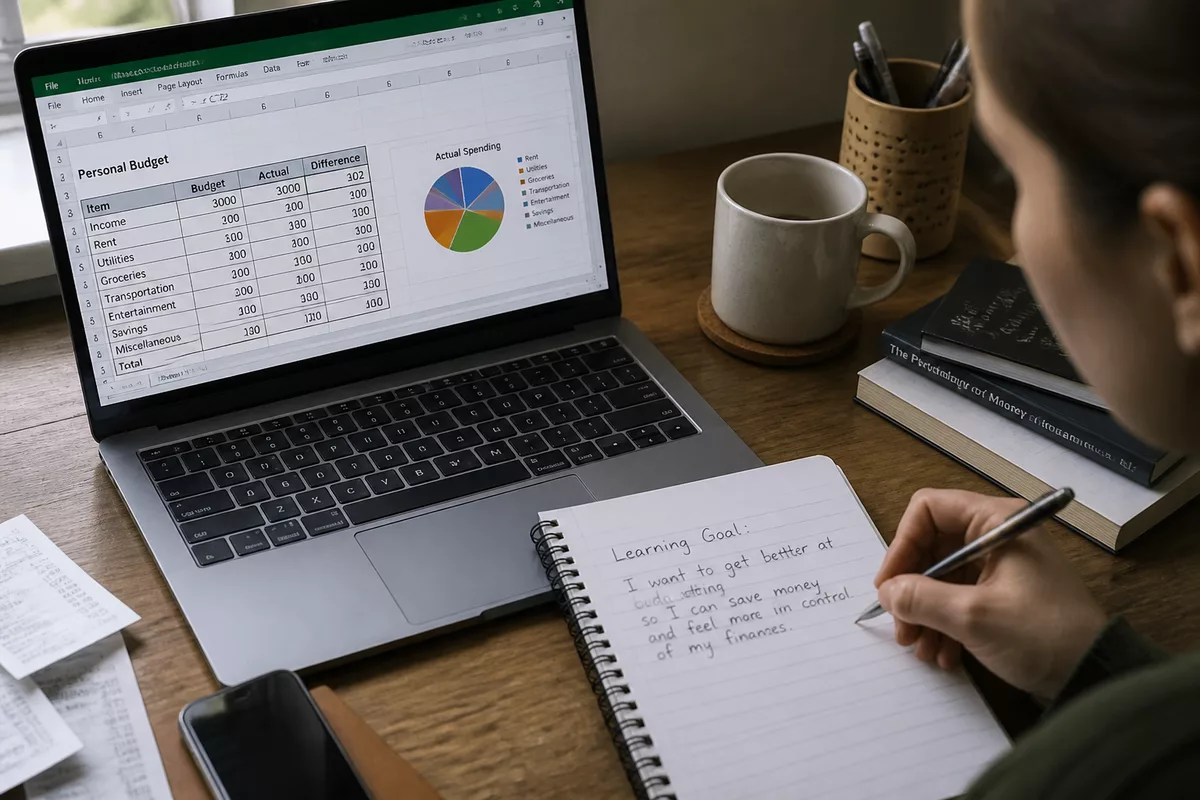
A useful first project could involve creating a clearly named folder structure, sharing a document with the correct permissions, preparing a short presentation, or setting up stronger account protection. These tasks appear simple, but they build habits that support every later technology skill.
Digital productivity is the lowest-barrier option for learners who feel uncertain around computers. The limitation is specialization: basic tool use alone does not explain how software, data, or networks work in depth.
Spreadsheet and data analysis skills
Spreadsheet skills introduce formulas, sorting, filtering, charts, and simple dashboards through information that a learner already understands. A spreadsheet is a grid-based tool for organizing and calculating data, while data analysis adds a structured process for cleaning, comparing, visualizing, and interpreting information.
A personal budget, survey summary, or small sales dashboard makes a strong first project because the learner can see whether the calculations and categories make sense. More advanced data analysis can include SQL, Python, statistics, and data visualization. Data science goes further by combining programming, statistics, and sometimes machine learning.
Spreadsheet learning offers a practical bridge between everyday productivity and more technical analytics. The main trade-off is that large, messy, or frequently updated datasets require database concepts and stronger programming skills.
Coding fundamentals
Coding fundamentals teach a computer how to follow structured instructions. Variables store information, conditions make decisions, loops repeat actions, and functions organize reusable instructions. These concepts are more important than memorizing a particular language during the first stage.
Python is one possible first language because it can support small scripts, calculations, file organization, and data work. JavaScript and C++ are also established programming languages, but the appropriate choice depends on the project rather than on a universal ranking.
A beginner can start with a text-based calculator, a simple unit converter, or a file-organizing script. Coding may feel abstract when lessons remain disconnected from real problems, so the first project should be small enough to finish and explain.
Web development
Web development for beginners commonly starts with HTML for page structure, CSS for visual styling, and basic JavaScript for interaction. A webpage is not the same as a full web application: a complete application may also require data storage, user accounts, server-side logic, testing, and security controls.
A personal profile page or simple portfolio provides visible feedback and can motivate learners who enjoy design and immediate visual results. Web development combines creative decisions with technical problem-solving, which makes it a strong option for people who prefer to see changes directly on a screen.
The initial barrier is manageable, but advanced front-end work introduces frameworks, accessibility, responsive layouts, browser behavior, and application architecture. Beginners should learn the underlying structure before collecting several frameworks.
No-code automation
No-code automation connects applications through visual rules, triggers, and actions. A workflow might organize form responses, send reminders, or prepare a recurring report without requiring the learner to write a complete application.
The transferable skill is not memorizing one platform’s buttons. The deeper ability is to describe a process clearly, identify the trigger, define the required information, anticipate errors, and decide where human review remains necessary.
No-code automation suits practical problem-solvers who enjoy improving repetitive tasks. Platform limits, subscription changes, permissions, and unreliable input data can create problems, so every workflow needs a test and a fallback method.
Artificial intelligence literacy
AI literacy means using artificial intelligence tools with clear instructions, privacy awareness, fact-checking, and an understanding of limitations. Prompt quality matters, but responsible use also requires checking the output against reliable information and avoiding the unnecessary disclosure of confidential data.
Useful beginner exercises include comparing two document summaries, asking an AI tool to draft a structure, checking the draft against the original source, and recording which instructions improve the result. These activities teach workflow design rather than passive dependence on generated text.
Artificial intelligence literacy works best alongside subject knowledge and basic digital judgment. AI tools can accelerate drafting or comparison, but they do not remove the need to understand the task, verify claims, or protect sensitive information.
How do you choose the best technology skill for your situation?
Choose a first technology skill by matching your immediate goal, preferred way of working, available learning time, and motivation. A practical decision is more useful than a universal ranking: spreadsheets fit people who want measurable information, web development suits visual builders, and automation fits people who want to remove repetitive steps.
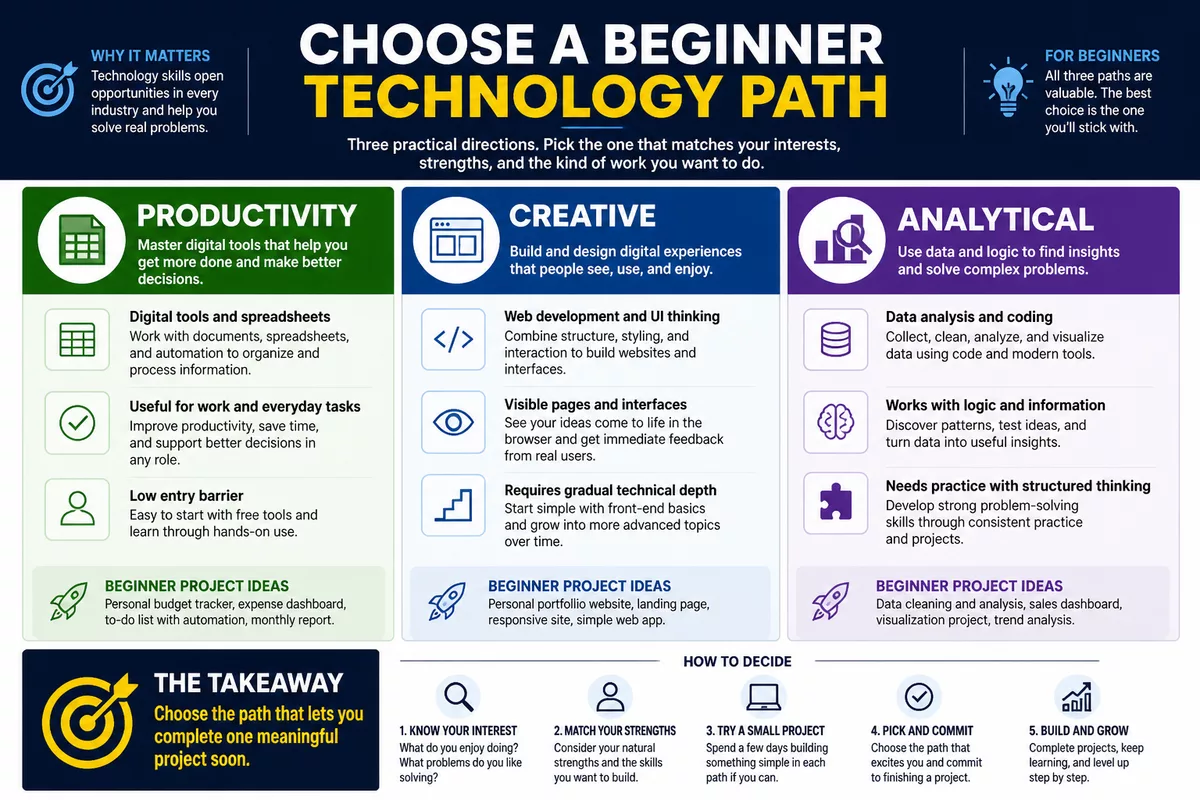
The following matrix compares the main paths without pretending that every learner starts from the same point. A short project remains the final test because reading about a skill cannot reveal whether the work feels meaningful to you.
Choose according to your main goal
- Workplace productivity: begin with digital tools, spreadsheets, and simple automation.
- Technical exploration: try coding fundamentals or web development.
- Business or freelancing: consider web creation, analytics, automation, and AI literacy.
- Personal protection: add cybersecurity fundamentals after learning how computers and networks function.
- General exploration: test two contrasting small projects, such as a spreadsheet dashboard and a webpage.
Choose according to how you like to learn
Visual and creative learners may prefer web development because the result changes visibly as they edit a page. Analytical learners may enjoy spreadsheets, data, or coding because these paths reward structured comparisons and precise instructions.
Practical problem-solvers often find automation engaging because each improvement can remove a repetitive action. People-focused learners may combine technology with communication, business, operations, or user research instead of pursuing a purely technical role.
A simple decision matrix for beginners
| Beginner profile | Suggested starting path | First result | What to add later |
|---|---|---|---|
| Needs immediate workplace confidence | Digital literacy and spreadsheets | Organized files or dashboard | Automation or data analysis |
| Enjoys visual creation | Web development | Personal webpage | JavaScript and accessibility |
| Enjoys logic and numbers | Coding or data analysis | Calculator or data summary | SQL, Python, or databases |
| Wants to reduce repetitive work | No-code automation | Reminder or form workflow | Scripting and process design |
| Wants safer digital habits | Cybersecurity basics | Account and device security checklist | Networks, systems, and security operations |
A realistic four-week technology learning roadmap
A four-week roadmap should create evidence of progress, not promise job readiness. Keep one primary skill, one beginner resource, and one practical project in focus. The end-of-month review can show whether the path is useful, enjoyable, confusing, or ready for a more advanced next step.
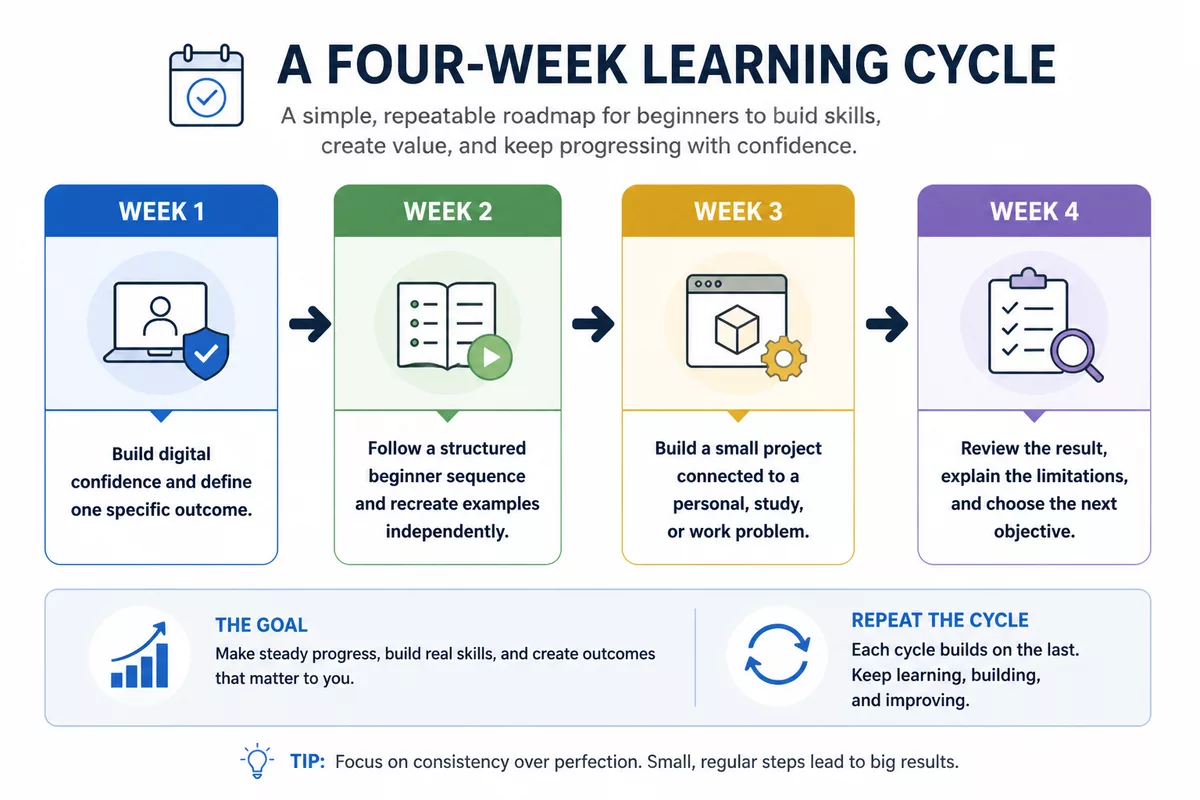
Week 1: Build digital confidence and define one goal
Learn the basic terminology for your chosen path and organize a simple learning environment. Select one specific outcome, such as creating a dashboard, webpage, automation, or secure account setup.
- Choose one primary skill instead of collecting several unrelated courses.
- Write down the finished result in one sentence.
- Prepare the required account, files, browser tools, or software.
- Record the terms that remain unfamiliar.
Week 2: Follow a structured beginner introduction
Use one coherent beginner lesson sequence and recreate examples independently. Official documentation and current beginner resources can help identify instructions that no longer match the software version you are using.
A learning log should record the concept, the action you performed, the error you encountered, and the correction that worked. This method is more useful than measuring progress only by the amount of video watched.
Week 3: Build a small project connected to real life
Choose a project that addresses a personal, study, or workplace problem. Document the original problem, the steps taken, the result, and the limitations so that another person could understand what you attempted.
AI tools can support brainstorming, explanations, or draft generation during this stage, but every output needs checking. The learner should understand the underlying process rather than copying a result that cannot be explained.
Week 4: Review evidence of progress and choose the next step
Review what was useful, enjoyable, frustrating, and still unclear. Improve the existing project or explain its limitations before immediately starting a new technology.
A sensible next objective follows demonstrated interest and practical value. The next step might be a larger spreadsheet, a more accessible webpage, a database exercise, a second automation, or basic network and security study.
Beginner mistakes, learning resources, and realistic expectations
Beginners often lose momentum by treating technology as a collection of fashionable tools rather than a set of problems to solve. Trying to learn several programming languages, cloud platforms, design applications, and AI tools at the same time usually creates shallow familiarity instead of a finished result.
Watching more lessons is not the same as gaining more ability; completed tasks provide stronger evidence of progress.
Free official tutorials, documentation, browser-based exercises, reputable courses, and supportive communities can reduce unnecessary spending. Check the publication date, software version, accessibility, instructor clarity, and beginner support before paying for a course or subscription.
Basic competence, independent projects, and professional readiness are separate milestones. A person may understand spreadsheet formulas without being ready for complex analytics, just as a webpage project does not automatically demonstrate full application development.
How to keep learning without overspending
- Start with official documentation, free tutorials, browser tools, and a small personal project.
- Compare free alternatives before paying for software or a course.
- Check whether the learning material matches the current version of the tool.
- Prefer resources that explain concepts and exercises instead of only showing finished results.
- Keep a record of completed tasks so that you can judge progress by evidence.
How to measure progress realistically
Useful milestones include explaining a concept in plain language, modifying an example without copying every step, and solving a small problem independently. Occasional confusion and repetition are normal because unfamiliar technical concepts rarely become automatic after one exposure.
Employability depends on the target role, relevant evidence, communication, and experience rather than one isolated skill. Spreadsheets, data literacy, web development, automation, and cybersecurity awareness can all provide useful foundations, but none guarantees a job or a particular income.
The goal of a first month is not to become a technology professional; it is to find out which kind of problem you are willing to keep solving.
Key points
- 🧭 Start with one practical outcome rather than one fashionable technology.
- 📊 Spreadsheets offer a clear bridge from productivity to data analysis.
- 💻 Coding and web development suit learners who enjoy structured building.
- ⚙️ Automation and AI literacy are strongest when paired with judgment and verification.
- 📅 Use four weeks of focused practice to choose your next step.
Frequently Asked Questions
What is the easiest technology skill to learn first?
Digital productivity tools and spreadsheet basics are often the quickest starting points because they produce visible results with limited technical setup. Personal experience still matters, so a learner who enjoys visual creation may find a simple webpage more intuitive.
Should a complete beginner learn coding or artificial intelligence?
Coding teaches structured problem-solving, while AI literacy teaches effective and critical use of digital tools. Start with the path that serves your immediate objective, then add the other foundation if it supports your projects.
Can I learn a technology skill without a technical background?
Yes, many beginner paths do not require advanced mathematics or formal technical education. Curiosity, structured practice, plain-language resources, and small projects can reduce the initial barrier.
How long does it take to learn a useful technology skill?
Useful progress is better measured through milestones than through a guaranteed number of days. Basic familiarity, an independent small project, and professional readiness are different stages that can require different amounts of practice.
Which beginner skill is most useful for getting a job?
The answer depends on the target role and the evidence expected for that role. Spreadsheets, data literacy, web development, automation, and cybersecurity awareness can support different paths, but employment also depends on communication, experience, and relevant projects.
Is coding necessary for a career in technology?
Coding is important in some development, data, and automation roles, but it is not required for every technology career. Digital operations, user experience, technical communication, cybersecurity awareness, project work, and digital marketing can involve technology without full-time programming.
What technology skill can I learn for free?
Digital literacy, spreadsheet basics, introductory HTML and CSS, beginner programming, and AI literacy can all be explored with free documentation and browser-based resources. Check the current terms of any platform before assuming that an advanced course, certificate, or software feature is free.