The Easiest Tech Jobs to Get Without Years of Experience
The Easiest Tech Jobs to Get Without Years of Experience
The easiest tech jobs to get without years of experience are usually help desk technician, IT support specialist, technical customer support representative, junior QA tester, customer success specialist, and implementation or onboarding specialist roles. These positions still require practical skills, clear communication, and evidence that you can solve problems reliably.
This guide ranks beginner-friendly career paths by entry barrier, technical preparation, customer contact, portfolio expectations, and likely work conditions. You will see which roles fit different backgrounds, whether coding is necessary, how to build proof of skill, and how to prepare for a first application without relying on a degree or certificate alone.
Quick Summary
🔎 Help desk, IT support, and technical customer support usually offer the clearest starting point for people who enjoy troubleshooting and explaining solutions.
🧪 Manual QA testing can suit detail-oriented beginners, while implementation and customer success roles favor organization, communication, and product knowledge.
🧰 No previous technology job does not mean no preparation. A small portfolio, realistic practice, and targeted applications can replace some formal experience.
📍 Remote entry-level roles are competitive. On-site work, customer contact, and shift schedules may create more accessible first opportunities.
What Makes a Tech Job Accessible to Beginners?
An accessible entry-level technology role is a job with a manageable learning curve, repeatable tasks, and hiring requirements that can be demonstrated through adjacent work, practical projects, or focused training. Accessibility does not mean that the position requires no skills. It means that a beginner can build credible evidence without spending years in the field.
The easiest tech jobs depend on the person applying. A former customer-service worker may be well positioned for technical support, while an administrator with strong organization skills may fit implementation or project coordination. Location, work authorization, local demand, education, certifications, shift availability, and the employer’s training process also influence hiring difficulty.
The difference between no tech experience and no experience at all
Someone with no technology job history may still have valuable professional experience. Customer service develops patience and issue ownership, administration develops documentation and process discipline, and repair work can build troubleshooting habits. These abilities transfer when a resume explains the connection to the target role.
Employers still assess reliability, communication, accuracy, and problem-solving when hiring for beginner positions. A candidate who has handled a high volume of customer requests or followed detailed procedures may present stronger evidence than someone who has completed several unrelated courses.
How to judge whether a role is genuinely entry level
Job titles can be misleading. A “junior” position may still require a substantial portfolio, while an entry-level support role may provide structured onboarding. Read current postings and separate essential requirements from preferred qualifications or unrealistic wish lists.
- Look for repeatable workflows, documented procedures, and supervised onboarding.
- Check whether adjacent experience in service, administration, operations, or communication is accepted.
- Identify the tools used every day, such as ticketing platforms, spreadsheets, knowledge bases, or content systems.
- Notice requirements for shifts, travel, on-site attendance, language ability, or work authorization.
The Easiest Tech Jobs to Enter Without Years of Experience
The most accessible beginner tech jobs are generally help desk, IT support, technical customer support, manual QA testing, customer success, and implementation or onboarding. The ranking below prioritizes low experience expectations, practical learning opportunities, transferable skills, and clear progression routes rather than claiming that one role is easy for every applicant.
Help desk technician ranks first because the work has a clear training path and directly demonstrates troubleshooting ability. The remaining roles can be equally suitable when a candidate’s previous experience matches the daily work more closely.
| Rank | Role | Main beginner evidence | Coding intensity | Typical work condition | Possible next step |
|---|---|---|---|---|---|
| 1 | Help desk technician | Practice tickets and troubleshooting guides | Low | Often customer-facing; on-site or shift work is possible | Systems administration or networking |
| 2 | IT support specialist | Test environment or device documentation | Low to moderate | Equipment and endpoint support may require on-site work | Cloud, networking, or cybersecurity support |
| 3 | Technical customer support | Support replies and escalation examples | Low to moderate | Customer contact is central; remote work varies | Support engineering or implementation |
| 4 | Junior QA tester | Test cases, bug reports, and regression checks | Low for manual QA | Usually team-based; remote availability varies | Automation testing or quality engineering |
| 5 | Customer success specialist | Onboarding or product education sample | Low | Frequent customer communication | Implementation or account management |
| 6 | Implementation or onboarding specialist | Workflow, training, or configuration plan | Low to moderate | Client meetings and project coordination | Business systems or operations |
1. Help desk technician
A help desk technician supports users with password resets, account access, device issues, software problems, and basic connectivity faults. Technicians record requests in a ticketing system, follow troubleshooting steps, document the result, and escalate problems that require higher-level access.
Beginner preparation usually includes operating-system basics, hardware terminology, simple networking, account security, and calm written communication. Customer-service experience can be highly relevant because users often need a clear explanation as much as a technical fix.
Help desk work may involve phones, shifts, office equipment, or on-site support, so it is not automatically a remote career. After gaining experience, common directions include systems administration, networking, cybersecurity support, and cloud operations.
2. IT support specialist
IT support is broader than a narrowly scoped help desk position. An IT support specialist may manage laptops, printers, software installations, user accounts, endpoints, basic networks, and internal documentation for an organization.
A beginner can create a small test environment, write a troubleshooting guide, or document a fictional device deployment. The project should explain the problem, the steps taken, the expected result, and the point at which escalation would be appropriate.
Entry requirements vary widely. Some employers accept transferable experience and basic training, while others expect prior device support or a certification. Review local postings before choosing a course or purchasing equipment.
3. Technical customer support representative
Technical customer support representatives help users troubleshoot a software product, interpret error messages, follow setup instructions, and escalate unresolved issues. The work combines product knowledge with written communication and careful use of a knowledge base.
Customer-service experience transfers well when the applicant can show how they handled difficult questions, recorded accurate information, and followed an issue through to resolution. A useful portfolio sample could include three support replies for common product problems and an escalation note for a more complex case.
Progression may lead toward technical support engineering, implementation, product education, or customer success. Remote work can be possible for software companies, but schedule coverage and customer time zones may affect availability.
4. Junior software quality assurance tester
A junior QA tester checks whether software behaves as expected. Manual testing commonly includes following test cases, reporting bugs, performing regression checks after a fix, and recording usability observations in a structured format.
Manual QA may not require programming at the beginning, although automation testing usually demands stronger technical knowledge. A small portfolio can contain test cases for a publicly available website or sample application, bug reports with reproduction steps, and a short regression checklist.
Competition can be significant because QA attracts career changers who prefer detail-oriented work. Applicants improve their position by writing precise reports rather than merely stating that an application “does not work.”
5. Customer success specialist at a software company
Customer success specialists help users understand a software product, complete onboarding, adopt useful features, and receive support throughout the relationship. The work is less focused on repairing devices and more focused on helping customers achieve an outcome with a product.
Communication, empathy, organization, and basic product knowledge matter more than advanced coding for many roles. A candidate can demonstrate readiness with a sample onboarding plan, a product-training outline, or a short guide that explains a complex feature in plain English.
Possible next steps include implementation, account management, product operations, and product education. Customer-facing work remains central, and some employers measure response times, adoption, renewals, or customer satisfaction.
6. Implementation or onboarding specialist
Implementation specialists guide new customers through software setup, configuration, training, and adoption. The role often includes scheduling meetings, tracking tasks, gathering requirements, maintaining spreadsheets, and documenting decisions.
Advanced coding is not always necessary. Industry knowledge, careful organization, time management, and client communication may be more important for a beginner implementation position. A practical project could show a fictional customer onboarding timeline, configuration checklist, training agenda, and handoff note.
Implementation roles can involve several active customers at once. Candidates should be comfortable following deadlines, clarifying incomplete information, and explaining technical steps to people with different levels of knowledge.
The Beginner Skills and Tools Employers Actually Look For
Beginner technology jobs usually reward role-specific fundamentals rather than broad knowledge of every technical field. A help desk applicant needs a different practice plan from a QA applicant, and a customer success candidate should not spend months learning advanced programming that the target postings do not mention.
Technical foundations for entry-level technology work
Basic hardware means understanding common devices and components. Operating-system knowledge includes files, permissions, updates, settings, and user accounts. Networking fundamentals cover concepts such as Wi-Fi, IP addresses, connectivity, and the difference between a local device problem and a wider service problem.
Security hygiene includes strong authentication practices, careful handling of access requests, and awareness of phishing or suspicious links. Beginner roles may also use spreadsheets, documentation systems, ticketing workflows, browser developer tools, or a simple command line.
- Support: practice diagnosing device, account, software, and connectivity problems.
- QA: practice test design, reproduction steps, expected results, and defect severity.
- Customer success: practice product explanations, onboarding plans, and structured follow-up.
- Implementation: practice timelines, requirements notes, configuration checklists, and handoffs.
Transferable workplace skills
Clear writing helps a support professional document an issue so another colleague can continue the investigation. Patience helps when a user cannot describe a problem precisely. Prioritization matters when several tickets arrive at the same time and not all issues have the same impact.
Reliable follow-through is also practical evidence. A portfolio project that explains decisions, limitations, and next actions can show ownership more convincingly than a list of software names.
Tools worth practicing
Microsoft 365 or Google Workspace, spreadsheets, collaboration platforms, knowledge bases, and ticketing concepts are useful across several beginner paths. The exact software varies by employer, so the transferable workflow matters more than memorizing one brand.
Web content candidates can practice with a content management system and browser tools. QA candidates can use a sample application. Support candidates can build a simple troubleshooting lab. The project should resemble a workplace deliverable, not only a course completion screen.
Do You Need a Degree, Certification, or Boot Camp?
A degree can help with structured learning and employer screening, but a degree is not the only way to demonstrate readiness for an entry-level technology job. Practical projects, relevant work history, targeted courses, certifications, and strong communication may compensate for the absence of a traditional academic background in some hiring processes.
CompTIA A+ and Google IT Support are optional pathways often associated with beginner IT learning, not universal requirements. Their usefulness depends on the target job postings, the candidate’s current knowledge, and whether the training produces practical evidence.
When a beginner certification can be useful
A certification can organize self-study and may help when several target postings explicitly mention the same credential. The credential should match the intended role rather than become a collection of unrelated badges.
Before paying for training, compare current local job postings. Identify recurring requirements, the tools employers name, and whether candidates are expected to work on-site or on a shift. A certificate alone does not prove that someone can troubleshoot, communicate with users, or follow a workplace process.
When a project is more persuasive than another course
Projects can make an abstract skill visible. A support applicant might show anonymized sample tickets and troubleshooting guides, while a QA applicant might show test cases and bug reports. An implementation applicant could present onboarding documentation or a project timeline.
Document each project with the problem, process, result, and lessons learned. Do not claim that a fictional project was professional client work. Honest labeling makes the evidence more credible.
How Can You Get Your First Tech Job Without Years of Experience?
You can improve your chances by choosing one target role, translating previous work into relevant evidence, building two or three focused projects, and applying to realistic adjacent titles. The process is more effective when applications, interview practice, and portfolio improvement happen together instead of waiting until every course is complete.
The goal is not to appear experienced; the goal is to make beginner-level ability easy for an employer to verify. Use the wording of genuine requirements in each resume, but do not copy irrelevant keywords or claim skills that are still being learned.
Build a small proof-of-skill portfolio
Two or three finished projects are usually easier to understand than a broad collection of incomplete lessons. Each item should match a task found in the target postings and show how you think, document, communicate, or troubleshoot.
- Create sample support tickets with diagnosis, action, escalation, and resolution notes.
- Write test plans, bug reports, and regression checks for a publicly available application.
- Build a spreadsheet workflow, content page, onboarding guide, or product-training document.
- Publish the work on a simple portfolio page or professional profile with clear explanations.
Rewrite your resume for entry-level technology roles
Lead with outcomes and tools rather than only job titles. A retail worker can describe customer volume, issue resolution, point-of-sale software, accuracy, and escalation. An administrator can highlight process improvements, documentation, spreadsheet use, and dependable follow-through.
Separate genuine skills from skills still being learned. Accurate wording such as “practicing basic SQL” is safer than presenting limited exposure as professional database experience.
Prepare for beginner-level interviews
Interviewers may ask how you would investigate an unfamiliar problem, prioritize several requests, or respond to a frustrated user. A strong answer explains the first information you would gather, the safest next step, the point of escalation, and how you would document the outcome.
Prepare examples that show learning speed, ownership, customer empathy, accuracy, and teamwork. Practical reasoning often matters more than reciting definitions without explaining how they affect the work.
A Realistic 90-Day Plan for Becoming Job-Ready
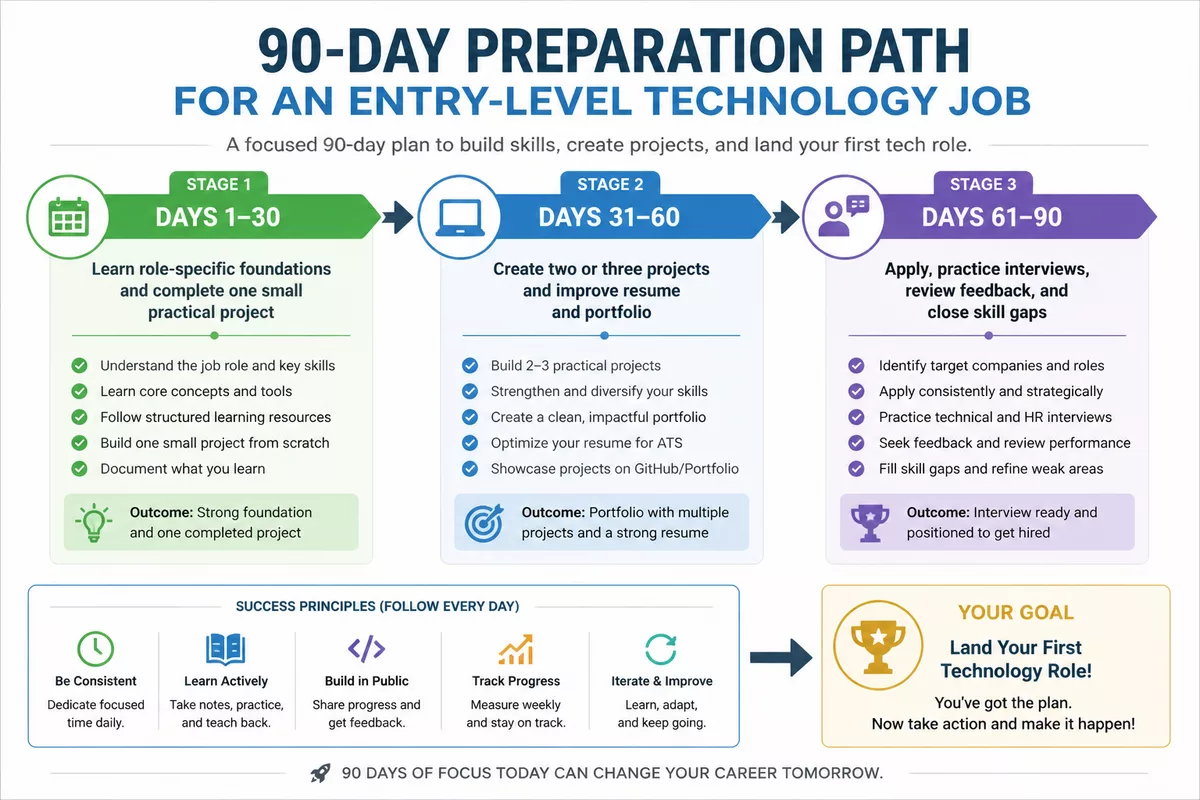
A 90-day preparation plan works best when it has one target role, a manageable weekly schedule, and regular feedback from real job postings. The plan does not guarantee employment, but it creates visible evidence and helps reveal which requirements deserve attention first.
Days 1 to 30: Learn the foundations
Choose one target role and study its terminology, tools, workflows, and common tasks. Complete one small project before attempting a large portfolio. Track local and remote postings to identify requirements that appear repeatedly.
Job postings should guide the learning plan, not dictate an attempt to master every technology. Mark each requirement as essential, preferred, or unrelated to the role you want.
Days 31 to 60: Create evidence
Complete two or three role-specific projects and document the decisions, results, and limitations. Improve the resume and professional profile so that each claims a visible example behind it.
Feedback can come from experienced professionals, career communities, or people working in the target function. Ask for specific criticism of clarity, realism, and relevance rather than general encouragement.
Days 61 to 90: Apply, interview, and adjust
Submit targeted applications consistently across suitable employers and work arrangements. Practice interviews while applying instead of postponing them until an employer responds.
- Choose one primary role and a small group of closely related titles.
- Compare each posting with your resume and identify one genuine evidence gap.
- Adapt the resume and portfolio explanation to the actual work described.
- Record interview questions and improve answers after each conversation.
- Review rejection patterns and address the most common skill or communication gap.
How Do You Choose the Best Beginner Tech Path for Your Strengths?
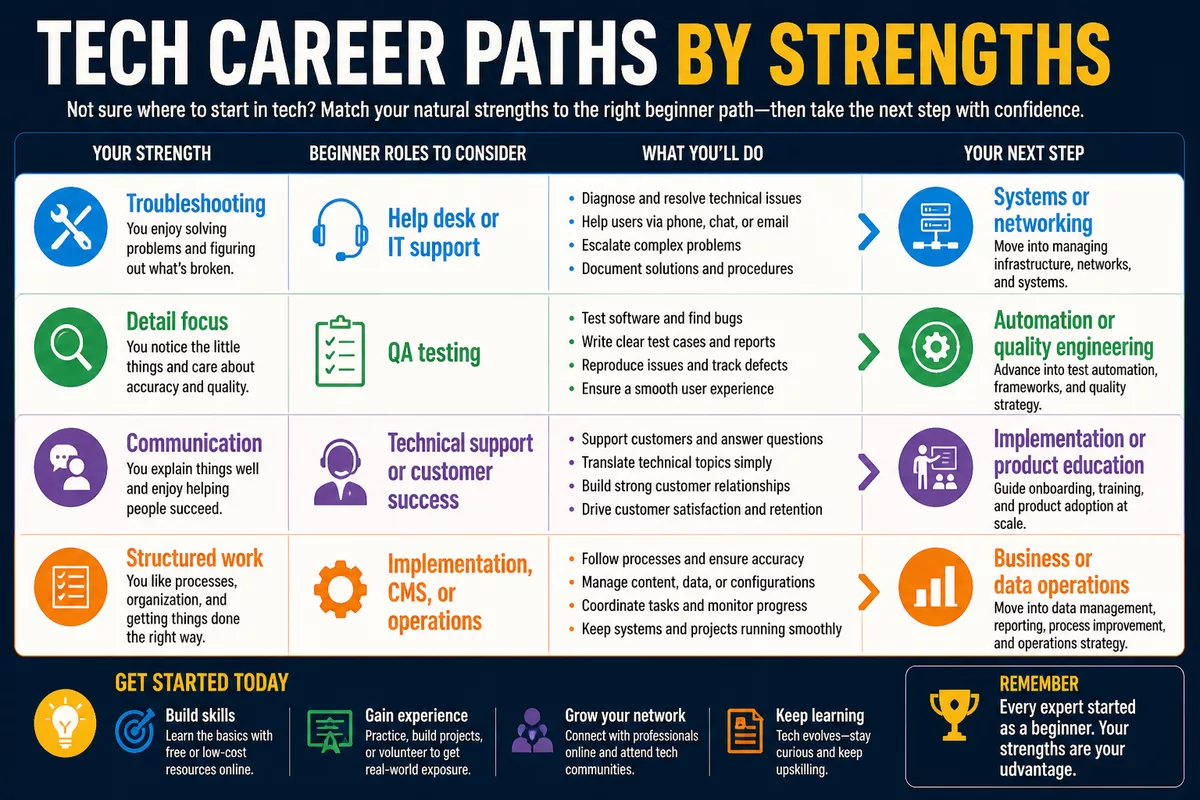
The best beginner technology path depends on the work you want to perform every day, not only on the role that appears easiest to enter. Help desk and support can involve frustrated users and shifts, while QA requires sustained attention to detail and implementation requires coordination across customers and internal teams.
Use your previous work as a starting point. Customer communication, organization, visual judgment, careful checking, writing, and comfort with numbers can each point toward a different entry-level technology path.
Choose help desk or IT support if you enjoy troubleshooting
Help desk and IT support fit people who like diagnosing device, account, software, and connectivity problems. The work offers a concrete way to build technical experience, although the first role may involve phone support, equipment handling, or an office schedule.
Potential next steps include systems administration, networking, cybersecurity support, and cloud operations. Progression depends on actual responsibilities and continued learning rather than job title alone.
Choose QA testing if you are detail-oriented
QA testing suits people who enjoy following steps, finding inconsistencies, and documenting defects. Manual testing can be a starting point without advanced programming, but automation and quality engineering require additional technical preparation.
Possible progression includes automation testing, quality engineering, business analysis, and product operations. Precision matters because vague bug reports are difficult for developers to reproduce.
Choose technical support or customer success if communication is your strength
Technical support and customer success fit people who can explain products clearly, manage expectations, and remain calm during difficult conversations. Both paths use product knowledge, but technical support usually focuses more directly on issue resolution.
Potential next steps include technical support engineering, implementation, account management, and product education. Customer-facing responsibilities remain part of many senior roles in this family.
Choose implementation, CMS, or operations work if you prefer structured workflows
Implementation, content management, and operations roles suit people who enjoy coordination, documentation, content quality, spreadsheets, and repeatable processes. These roles can be accessible to organized career changers with industry knowledge even when advanced coding is not required.
Potential next steps include business systems, digital operations, content operations, data operations, or workflow automation. Project coordination remains important because several tasks and stakeholders may move at once.
What Should You Expect About Pay, Competition, and Remote Work?
Pay depends on country, city, industry, employer size, shift schedule, previous experience, and role scope. A junior data analyst, data analyst, project coordinator, and digital project manager are not interchangeable job categories, so salary figures from one title should not be used as a universal benchmark for another.
Use current local job listings and official labor-market sources such as the U.S. Bureau of Labor Statistics when researching the United States. For another country, consult the relevant government labor agency or a recognized local source. Verify the date, occupational definition, location, and experience level before comparing figures.
“Entry level” describes career stage, not guaranteed ease of entry. A software developer role can be junior while still demanding substantial coding evidence.
Remote work is a work arrangement, not a substitute for experience. Beginner applicants may face stronger competition for remote roles than for suitable on-site positions.
How to evaluate a job offer beyond the salary
Examine the training quality, manager support, schedule, on-call expectations, location, promotion path, and technologies used. A modest first salary may still provide useful transferable experience if the position includes supervised troubleshooting, documentation, customer communication, or exposure to business systems.
Check whether the role produces evidence that will remain useful after the first year. A job with no learning access, unclear responsibilities, or excessive unpaid availability may be less valuable than the headline pay suggests.
Why the first role may not be remote
On-site positions can provide supervised training, direct access to equipment, and more immediate contact with users or colleagues. Help desk and endpoint support roles may require physical access, while software support and customer success may have more remote possibilities.
Remote entry-level technology jobs are realistic in some companies, but they are not the default for every beginner. Build stronger evidence, verify location restrictions, and apply selectively rather than treating remote work as a guaranteed feature of technology careers.
Key Takeaways
- 🛠️ Help desk and IT support offer clear entry routes for practical troubleshooters.
- 🧪 Manual QA suits detail-oriented candidates who can document defects precisely.
- 💬 Technical support and customer success reward communication and product empathy.
- 📁 Two or three focused projects can make beginner skills easier to verify.
- 📍 On-site or shift-based work may provide more accessible first opportunities than remote roles.
Frequently Asked Questions
What is the easiest tech job to get with no experience?
Help desk technician and technical customer support roles are often accessible starting points because they use repeatable workflows and transferable customer-service skills. Applicants still need basic technical knowledge, communication ability, and evidence that they can investigate problems responsibly.
Can I get an IT job without a degree?
Some entry-level IT employers accept practical projects, relevant work experience, targeted training, or certifications instead of a degree. Requirements vary by employer and location, so compare current postings before choosing a qualification.
Do I need to learn coding to start a tech career?
No, coding is not required for many help desk, technical support, customer success, implementation, and manual QA roles. Coding becomes more important for software development and automation testing, while basic scripting can become useful later in some support paths.
How long does it take to qualify for an entry-level tech job?
The timeframe depends on your starting skills, target role, study schedule, and local requirements. A focused 90-day plan can produce initial evidence and applications, but it does not guarantee an interview or job offer.
Are entry-level remote tech jobs realistic?
Remote entry-level roles exist, particularly in some software support and customer-facing teams, but competition and location restrictions can be significant. On-site, hybrid, or shift-based positions may offer a more accessible first step for candidates without professional technology experience.
Sources for Further Verification
The U.S. Bureau of Labor Statistics provides occupational definitions, employment data, and wage information for the United States. O*NET Online describes tasks, skills, and technology associated with many occupations. Official certification providers can confirm current exam objectives, while individual employers remain the authority for the requirements of a specific vacancy.

For an individual career decision, verify the current posting, location, work authorization conditions, schedule, salary methodology, and training expectations. This article provides general education and does not replace advice from a qualified career professional or an official labor-market source.