Best Trip Planning Site for Building a Complete Itinerary
The best trip planning site for most travelers is Wanderlog because it combines destinations, reservations, maps, daily activities, collaboration, budgeting, packing lists, and offline trip access in one workflow. It is particularly useful when your trip includes several stops and you want to move between research and day-by-day scheduling without switching constantly between services.
TripIt is a stronger choice when your bookings already exist and you mainly need them organized automatically. Google Maps works well for a simple free plan, while a route-focused service or a shared workspace may suit road trips and highly customized group travel better. This is a documentary comparison based on manufacturer and merchant pages and published tests; the platforms were not all tested directly by the editorial team.
Quick summary
🧭 Wanderlog is the strongest all-in-one option for visual, flexible itineraries with maps, bookings, collaboration, budgeting, and offline access.
📩 TripIt is more suitable when the main task is turning confirmation emails into one chronological travel plan.
🗺️ Google Maps is a practical free starting point, but saved places do not automatically become a complete daily itinerary.
⚠️ No planner reliably handles local opening hours, realistic pacing, and every transport connection without human checking.
Quick answer: what is the best trip planning site for most travelers?
Wanderlog is the best overall fit for travelers who want one visual workspace for research, reservations, maps, daily scheduling, group edits, budgets, and offline access. TripIt wins for automatic booking organization, Google Maps for a familiar free setup, and route-focused tools for journeys where driving order matters more than attraction research.
Wanderlog ranks first here because its documented feature set covers more stages of a complete itinerary than the alternatives: it brings the itinerary and map together, accepts hotel and flight reservations, supports route optimization, allows real-time collaboration, and includes budget and expense tools. Its official page also states that more than one million people have tried its planning features, although that figure is not a measure of comparative quality.
The most important limitation is that the free and paid experiences are not identical. Feature availability can change by subscription tier, platform, and region, so check the current Wanderlog product page before committing. For a short trip with two bookings, Wanderlog may be more structure than you need; for a multi-stop holiday shared by several people, its broader workflow makes more sense.
| Planning need | Most suitable option | Why it fits |
|---|---|---|
| All-in-one itinerary building | Wanderlog | Combines maps, reservations, activities, collaboration, budgets, and offline plans. |
| Free, familiar place saving | Google Maps | Lets travelers save locations and create custom maps. |
| Automatic booking organization | TripIt | Builds an itinerary from forwarded confirmation emails. |
| Transport discovery | Rome2Rio | Searches connections across rail, bus, ferry, and air networks. |
| Currency checks abroad | XE | Provides a currency conversion tool for international travelers. |
What makes a trip planner good for a complete itinerary?
A complete itinerary connects research, destinations, bookings, transport, daily timing, maps, sharing, and access during the trip. The useful test is not the number of buttons in an app; it is whether a reservation change can be reflected in the daily plan without rebuilding everything elsewhere.
Look for editable times, manually added notes, links, rearrangeable stops, reservation imports, map context, mobile readability, collaboration permissions, and a way to access essential information when connectivity is weak. Pricing also matters: a free trip planner may cover saved places, while offline access, alerts, exports, or advanced routing can be reserved for a paid tier.
Feature lists and plan limits change. Verify the current product page, supported devices, country availability, and subscription conditions before transferring every booking and saved location into one service.
Planning flexibility versus booking management
TripIt illustrates the difference clearly. You forward confirmation emails to [email protected], and the service creates an itinerary from those messages, including bookings made with different providers. That is efficient after flights, hotels, or other reservations are confirmed.
A flexible trip itinerary builder starts earlier. It should let you save a possible museum, add a private note, change a time, move a stop to another day, and keep optional ideas separate from fixed reservations. This matters when weather, opening information, or transport changes force a day to be reorganized.
Which practical tests matter on the road?
Before relying on a travel planning app abroad, create one real test day and check five things: whether changes synchronize, whether the mobile view remains readable, whether maps or plans can be downloaded, whether other travelers have the right permissions, and whether essential details can be exported or retained independently.
No tool can fully automate local opening hours, realistic walking pace, meal breaks, border procedures, or every transport connection. Automatic route suggestions are useful starting points, not a substitute for checking the provider responsible for the reservation.
Best trip planning sites compared
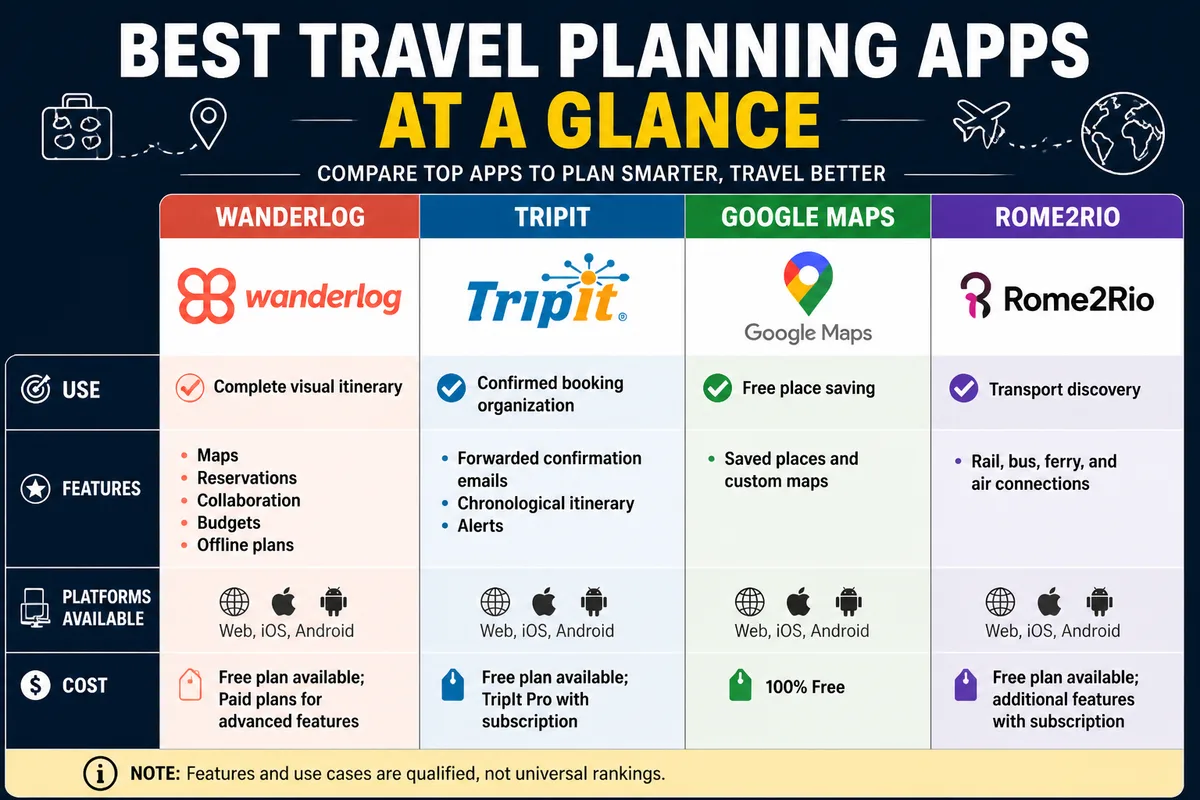
Wanderlog leads for breadth, while TripIt is more specialized in confirmed bookings. Google Maps is useful for free map-based research, and Rome2Rio supports transport discovery rather than acting as a complete day planner. The comparison below uses only features documented for the named services; a blank or qualified entry means the information is not established on a comparable basis.
| Platform | Best use case | Itinerary building | Reservations | Maps and routes | Collaboration | Mobile or offline access | Price model |
|---|---|---|---|---|---|---|---|
| Wanderlog | Complete, visual, multi-stop trips | Detailed dates, destinations, activities, and reservations | Hotels, flights, and other services can be imported or stored | Map view and automatic route optimization | Real-time planning with invited trip mates | Mobile apps and downloadable plans are documented | Free version and Pro subscription; current price to verify |
| TripIt | Confirmed booking organization | Chronological itinerary created from forwarded confirmations | Can combine bookings from different providers | Transport options and airport or terminal maps are documented for relevant plans | Plan sharing is documented | Multi-device access is documented; current offline conditions to verify | Free plan; Pro conditions and price to verify |
| Google Maps | Free place saving and map research | Basic organization through saved places and custom maps | Not a complete booking organizer on the documented facts | Strong map context; complete itinerary features not established here | Sharing depends on the list or map setup | Connectivity and account access should be checked before departure | Free core mapping tools |
| Rome2Rio | Transport discovery between destinations | Not documented here as a full daily itinerary builder | Not documented here as a reservation organizer | Searches rail, bus, ferry, and air connections | Not communicated | Offline itinerary capability not communicated | Current conditions to verify |
| Notion or a shared workspace | Custom group documents and planning databases | Flexible, but setup is manual | Storage depends on the template or workflow | Map and routing functions may require external tools or integrations | Shared editing depends on workspace permissions | Current mobile and offline conditions depend on the chosen service and setup | Current plan conditions to verify |
See the current TripIt itinerary service for supported imports and plan features. For transport comparisons, Rome2Rio is a separate layer rather than a replacement for a day-by-day planner: its documented coverage includes more than 200,000 rail lines, 700,000 bus routes, 12,000 ferries, and 50,000 air routes.
Detailed reviews: which planner fits each travel style?
The right choice depends on where planning becomes difficult. Wanderlog reduces the friction between saved places and daily scheduling; TripIt reduces the work of collecting confirmations; Google Maps reduces the cost of starting. The platforms should therefore be judged by the bottleneck they remove, not by a universal ranking.
Wanderlog: best overall for visual day-by-day itinerary building
Wanderlog is the strongest overall choice when you are still researching as well as organizing. Its documented workflow brings an itinerary and map into the same interface, supports hotel and flight reservation imports, and allows travelers to arrange places across dates and destinations.
It also includes route optimization, real-time collaboration, budgets, expense tracking, cost splitting, packing lists, and downloadable trip plans. The App Store rating is listed as 4.9 out of 5, and the Google Play rating as 4.7 out of 5 on the supplied product information; ratings can change and should be checked on the stores before purchase.
Choose Wanderlog for a couple comparing restaurants, a family dividing activities between several cities, or a group that needs one shared version of the plan. Skip it when all you need is a chronological list of already-confirmed flights and hotels, or when the current paid-tier limits do not justify the extra features.
TripIt: best for organizing confirmed bookings
TripIt is built around a reservation-first workflow. Forward confirmation emails to [email protected], and it creates a consolidated itinerary that can include bookings made through different providers.
That approach is particularly useful for frequent travelers who already have flights, accommodation, rental arrangements, or other reservations. TripIt also documents real-time flight alerts and travel reminders through its Pro offer, while sharing, calendar synchronization, multi-device access, transport options, and airport or terminal maps are listed among its plan features.
TripIt is not the first choice for building a trip from a blank map. Choose it when confirmation management is the main problem; skip it when you need extensive attraction research, visual day design, or collaborative route experimentation before booking.
Roadtrippers: best for route-led road trips
A route-led road trip needs a different starting point from a city break: the order of stops, driving distances, overnight handoffs, and available time shape the itinerary from the beginning. Roadtrippers belongs in this category, but the supplied material does not provide a comparable current feature sheet, route limit, regional coverage statement, or subscription price for a reliable detailed ranking.
For that reason, do not treat Roadtrippers as objectively superior to Wanderlog on the information available here. Check its current official route, coverage, and subscription pages before choosing it for a long journey, and compare one real route with the exact number of stops you expect to plan.
It is a candidate for travelers whose main bottleneck is road sequencing rather than booking consolidation. It is not a documented recommendation for travelers who specifically require confirmed-email imports, shared budgets, or offline plans.
Google Maps and Google Travel: best free, familiar starting point
Google Maps is a sensible free trip planner for saving hotels, restaurants, attractions, and neighborhoods while researching. It allows users to save places and create custom maps, which is enough for a short city break with a small number of fixed commitments.
The limitation is structural: a saved map is not automatically a complete itinerary. You may still need to assign times, add reservation details, sequence stops, record confirmation numbers, and share a current day plan separately. Account access and connectivity should also be checked before departure.
Use Google Maps when familiarity and low friction matter most. Do not use it alone for a complex group itinerary where several people must edit a schedule, track expenses, and distinguish fixed bookings from optional ideas.
Notion or a shared workspace: best for fully custom group planning
A shared workspace can be suitable when the group wants to combine notes, budgets, voting, documents, packing lists, and decisions in one custom structure. Its advantage is flexibility: the travelers decide which fields, views, and pages they need instead of adopting a fixed travel workflow.
The cost is manual setup. The supplied platform information does not establish a specific Notion travel template, booking-import capability, routing system, offline behavior, or current plan price, so those points must be checked for the exact workspace and integrations used.
Choose a shared workspace for a group comfortable maintaining its own database. Skip it when you want automatic confirmation parsing, ready-made route optimization, or a polished travel itinerary without building the system first.
How should you choose an itinerary planner by trip type?
Start with the part of planning that consumes the most time. A short solo break usually needs quick place saving; a family holiday needs shared editing and a single current plan; a multi-city journey needs route logic and reservation handoffs.
For a free trip planner, Google Maps can be enough when the trip has one destination and few fixed times. Paying for a tier becomes easier to justify when offline access, alerts, automatic organization, route tools, or group cost tracking solve a specific problem rather than merely adding more features.
For solo and short-break travelers
Use Google Maps for a lightweight collection of places, or Wanderlog if you want those places arranged into days with reservations and map context. Avoid a heavy custom workspace when the itinerary has one destination and only a few bookings; manual setup can take longer than the trip itself.
For couples, families, and group travel
Wanderlog is the clearest documented fit when shared editing, budgets, expense tracking, and one live itinerary matter. Assign decisions outside the public plan when necessary, and avoid placing passport numbers, payment details, or other sensitive personal information in broadly shared links.
For road trips and multi-city itineraries
Prioritize stop sequencing, travel times, lodging locations, route changes, and contingency space. Wanderlog can combine a visual itinerary with map and route features, while Rome2Rio can help investigate connections between destinations; neither removes the need to verify the actual transport provider.
For travelers who already have bookings
Choose TripIt when your primary task is consolidating confirmations from different providers. Choose Wanderlog instead when those bookings are only the framework and you still need to research, place activities on a map, build flexible days, and coordinate with other travelers.
How to build a complete itinerary without overplanning
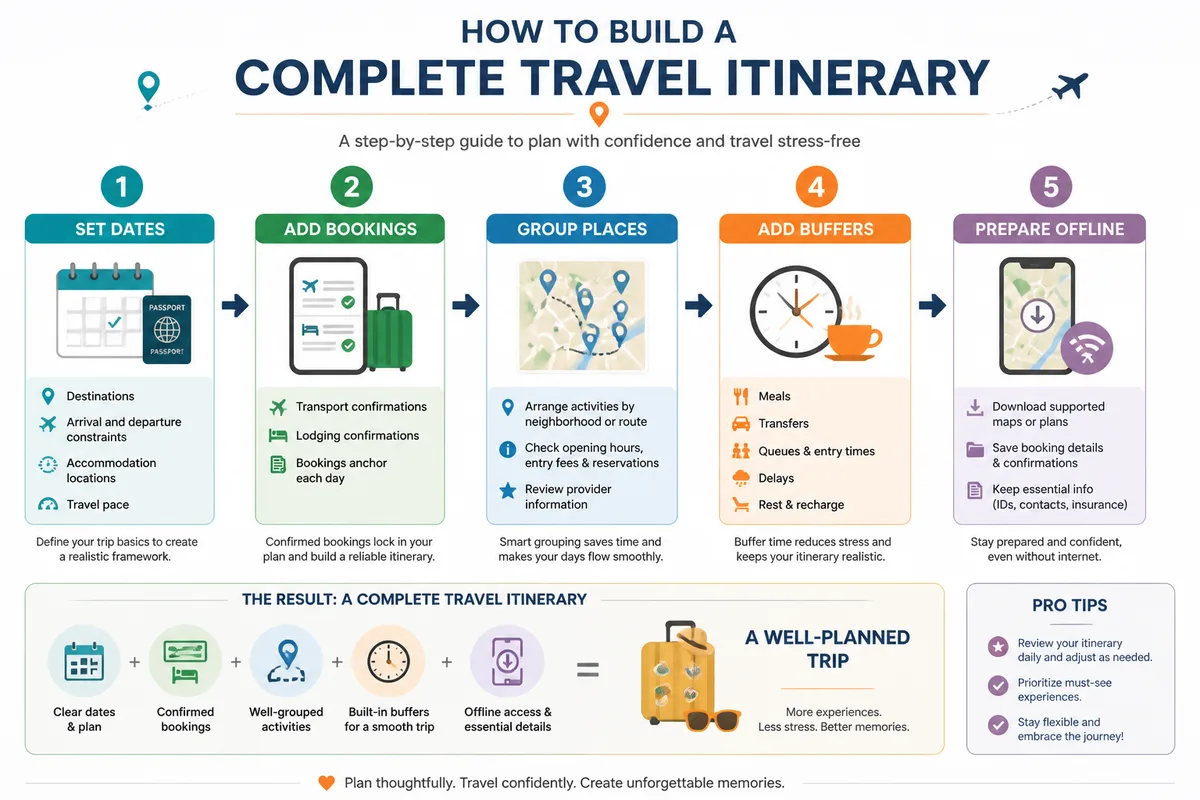
Build the skeleton before filling every hour. Dates, arrival constraints, accommodation locations, and confirmed transport determine what can realistically fit; attractions should be added around those anchors, not treated as if every day begins with unlimited time.
The following sequence works in Wanderlog, TripIt combined with a map service, Google Maps, or a shared workspace. Keep optional ideas visually separate from reservations so one delay does not make the entire day look broken.
Build the trip framework before adding attractions
Enter the dates, destination sequence, arrival and departure times, accommodation addresses, and travel pace first. Add flights, trains, ferries, and hotels next because a fixed arrival or check-in time limits the realistic beginning and end of a day.
Do not place every possibility directly into the main schedule. Create a separate list for optional restaurants, museums, viewpoints, or rainy-day alternatives. That distinction makes the itinerary usable when one reservation changes.
Turn saved places into workable days
-
Set the fixed anchors
Enter confirmed transport, accommodation, timed tickets, and any activity that cannot be moved.
-
Group nearby stops
Place attractions, meals, and errands in geographic clusters instead of crossing the same city repeatedly.
-
Check provider information
Confirm opening information, arrival instructions, and reservation conditions directly with the relevant venue or transport provider.
-
Add realistic gaps
Allow time for transfers, queues, meals, rest, and unexpected delays before adding another optional stop.
-
Separate optional plans
Keep backup ideas outside the fixed schedule so the core day remains readable and easy to change.
Make the plan usable when connectivity changes
Download supported maps or itinerary data before departure, then open the downloaded version once to confirm that it contains what you need. Keep key booking details independently as well: provider name, confirmation reference, address, date, and contact channel.
For group travel, test every person’s access before leaving. A shared link that works for the organizer may not provide the same editing or viewing permissions to everyone else.
Final verdict: which tool matches your planning bottleneck?
Wanderlog is the strongest overall recommendation for travelers building a complete, visual itinerary with maps, reservations, collaboration, budgets, and offline plans. Its advantage comes from workflow coverage, not proof that it is universally superior.
TripIt is the better choice for automatic booking organization. Google Maps is the better free starting point for simple map-based research. A route-focused service deserves consideration when driving order determines the trip, while a shared workspace suits groups that value custom databases more than automation.
Test one real travel day before migrating your entire trip. Add a booking, move an activity, share the plan, and check offline access. If that small workflow feels clear, the platform is more likely to remain useful when the itinerary becomes busy.
How we compared
This comparison was prepared on August 25, 2026 from official platform pages and documented product information. Platforms were assessed by itinerary depth, booking organization, maps and routing, collaboration, mobile or offline access, and pricing transparency. No universal winner is claimed, and current availability, subscription conditions, and prices should be verified on the relevant provider page before purchase or migration.
Frequently Asked Questions
What is the best free trip planning website?
Google Maps is a practical free starting point for saving places and creating custom maps. For a more structured itinerary, check whether Wanderlog’s current free version includes the features you need.
Which trip planning site is best for group travel?
Wanderlog is the strongest documented fit for shared itinerary editing, budgets, expense tracking, and cost splitting. Check permissions before sharing and keep sensitive personal information out of public links.
Can a trip planning site automatically organize flights and hotels?
TripIt can create an itinerary from confirmation emails forwarded to [email protected] and can combine bookings made through different providers. Wanderlog also supports hotel, flight, and other reservation imports, but current import conditions should be checked on its official page.
What is the best itinerary planner for a road trip?
Wanderlog is a documented option when you want maps, route optimization, stops, reservations, collaboration, and offline plans together. A route-focused service may be preferable when driving order and stop discovery are the central planning tasks; verify its current coverage and route limits first.
Do trip planning sites work offline, and are they better than a spreadsheet?
Wanderlog documents downloadable trip plans, while offline behavior varies across other platforms and subscription tiers. A trip planner is usually more convenient for maps, reservations, and mobile access; a spreadsheet remains useful when the group needs a fully custom structure and is willing to maintain it manually.