Small Business Social Media Workflow: A Simple Beginner’s Guide to Consistent Marketing
How can a small business market itself on social media without posting randomly every day? A small business social media workflow turns goals, audience research, content planning, creation, approval, publishing, engagement, and measurement into one repeatable process.
The practical result is a manageable system: choose one or two suitable platforms, plan content with a calendar, batch related tasks, review posts before publishing, and use recurring reports to improve the next cycle. You do not need to be active everywhere.
What Does a Social Media Workflow Do for a Small Business?
A social media workflow moves an idea from a business objective to a published post and then into engagement, reporting, and optimization, with clear tasks and ownership at each stage. It gives a solo owner or small team a reliable operating rhythm instead of a daily scramble for ideas.
Use one repeatable weekly system.
A workflow connects several activities that are often handled separately: defining the purpose of a campaign, identifying the audience, selecting platforms, planning formats, creating assets, checking accuracy, scheduling content, responding to people, and reviewing performance. A content calendar records dates and topics; the workflow also explains what happens before and after each date.
For a one-person business, ownership may remain with one person while the checkpoints stay visible. In a small team, a writer, designer, reviewer, and community manager can receive separate responsibilities, even when one employee fills two roles. Agencies also benefit from documented handoffs because several client accounts can otherwise create conflicting deadlines.
A practical workflow can be represented in five phases or expanded into eight or ten steps. Those counts describe different levels of detail, not universal industry standards.
How Do You Build a Small Business Social Media Workflow?
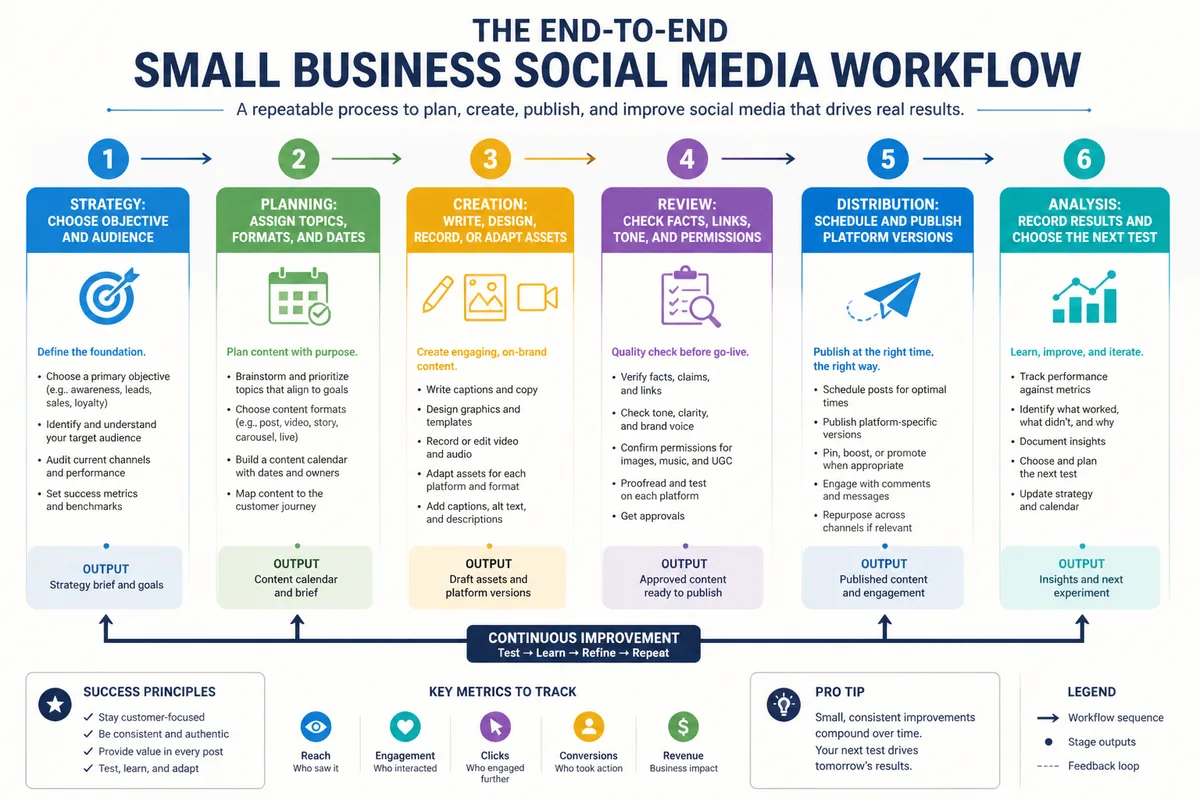
Build the workflow in chronological order: define one business goal, understand the audience, choose suitable platforms, plan content, create assets, review them, publish, manage conversations, and measure what happened. Each stage should have an owner, a deadline, an expected output, and a simple success measure.
Start with the business result.
The workflow should answer four operational questions before anyone creates a post: what needs to happen, who handles it, when it is due, and how the team knows the task is complete. A basic workflow template can use these fields: stage, task, owner, input, output, deadline, approval status, platform, and KPI.
| Stage | Task | Output | Owner |
|---|---|---|---|
| Strategy | Choose the objective and audience | One written campaign goal | Owner or strategist |
| Planning | Assign topics, formats, and dates | Content calendar | Content manager |
| Creation | Write, design, record, or adapt assets | Draft post and media | Creator |
| Review | Check facts, links, tone, and permissions | Approved post | Reviewer |
| Distribution | Schedule and publish platform versions | Live content | Publisher |
| Analysis | Record results and decide the next test | Short performance report | Owner or analyst |
Step 1: Set one business goal
Choose one primary objective for the next planning cycle. Examples include generating qualified enquiries, increasing visits to a local store, supporting customer retention, or making a new service easier to understand.
Keep the goal specific.
Connect the objective to a practical KPI, such as link clicks, enquiries, bookings, saves, shares, or completed actions on a tracked landing page. Follower growth and likes can provide context, though they rarely explain whether social activity helped the business outcome.
Step 2: Define the audience and platforms
Describe the intended audience using real business knowledge: customer type, location, needs, buying questions, objections, and preferred communication style. Select one or two priority platforms where that audience can reasonably encounter the business.
One strong platform beats five neglected ones.
A local service business might prioritize a platform that supports location discovery and customer conversations, while a professional consultancy may prefer a network where expertise-led posts fit naturally. Platform choice should follow audience fit, content capability, available time, and the goal.
Step 3: Choose content pillars
Create three to five repeatable content pillars that connect customer needs with the business offer. A bakery might use product education, behind-the-scenes preparation, seasonal information, customer questions, and local community content.
Build an idea bank.
Record questions from sales conversations, support messages, website searches, product feedback, and recurring objections, then turn each useful question into several possible formats. This produces social media content ideas with a clear business connection instead of forcing the team to invent a topic at the last minute.
How Should You Plan a Social Media Content Calendar?
A social media content calendar assigns topics, formats, platforms, calls to action, owners, and publication dates before production begins. It gives the business a visible publishing schedule while leaving room for timely updates, customer replies, and changes caused by events or platform conditions.
Plan less than you can barely produce.
Start with a cadence the business can sustain for several cycles, then adjust after reviewing workload and results. There is no universal answer to how often to post on social media because audience behavior, platform norms, industry expectations, and available resources differ.
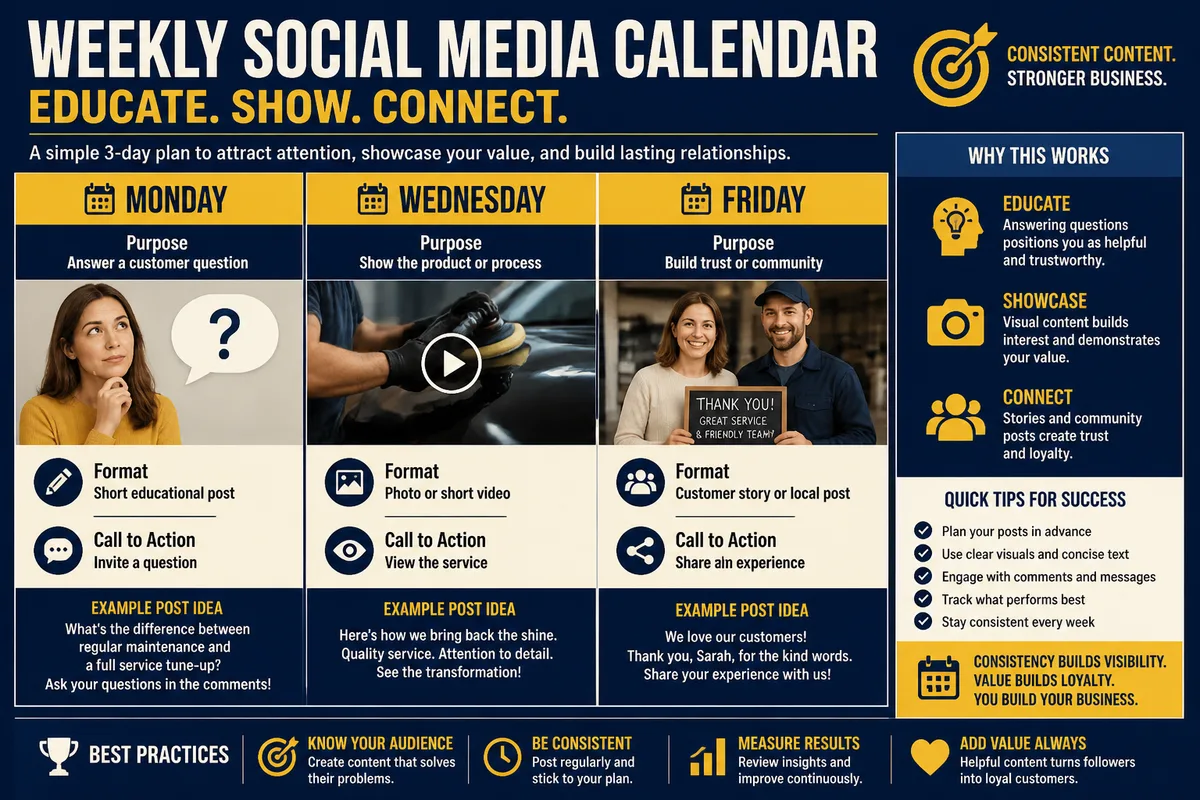
A simple weekly calendar could contain one educational post, one proof or demonstration post, one customer-focused post, and one offer or next-step post. The mix should reflect the objective rather than follow a rigid ratio.
| Day | Purpose | Format | Call to action |
|---|---|---|---|
| Monday | Answer a customer question | Short educational post | Invite a question |
| Wednesday | Show the product or process | Photo or short video | View the service |
| Friday | Build trust or community | Customer story or local post | Share an experience |
Keep the calendar operational. Add columns for draft status, asset location, approval, scheduled date, platform adaptation, and measured result so that the calendar functions as a social media workflow template rather than a list of vague ideas.
How Do You Create and Batch Social Media Content?
Content batching means grouping similar production tasks, such as researching several topics, writing multiple captions, or creating several visual assets in one session. It reduces repeated context switching and makes a limited marketing budget and limited working time easier to manage.
Research before production.
Begin with the audience question, intended action, main message, supporting proof, format, and platform. Then create a source draft and adapt it for each channel instead of copying identical wording everywhere, because length, media treatment, links, and audience expectations vary.
One useful idea can become a short text post, a visual explanation, a brief video outline, an email topic, or a customer-service response. The adaptation should preserve the central fact while changing the opening, format, and call to action for the platform.
A simple content quality checklist
- Does the post support the current business objective?
- Is the intended audience clear?
- Can every factual claim be checked?
- Does the asset have permission for commercial use?
- Does the caption use plain, recognizable language?
- Is the call to action appropriate for the reader’s next step?
- Has the content been adapted for the selected platform?
AI tools may assist with outlines, variations, or repurposing, though every draft needs human review for accuracy, tone, privacy, originality, and suitability. Automation should reduce repetitive work while preserving a genuine human response to customers.
How Do You Review, Schedule, and Publish Posts?
Review each post before publication, then schedule or publish the approved platform-specific version. A useful approval process checks the message, facts, visual asset, link, permissions, accessibility, brand voice, timing, and customer sensitivity before the post becomes public.
Approval protects the business.
For a solo owner, the review may be a short pause using a checklist before scheduling; for a team, the creator marks the draft ready, a reviewer approves or requests changes, and the publisher handles final scheduling. Record the status in one shared location so no one relies on scattered messages.
Scheduling tools can centralize publishing, approvals, monitoring, and reporting, though they are optional components rather than requirements. A spreadsheet combined with native platform tools may suit a very small operation, while a larger team may need permissions, shared calendars, and a social inbox.
Before publishing, confirm the date, time zone, destination link, image crop, tags, disclosure requirements, and platform formatting. A scheduled post still needs monitoring after publication because comments, mentions, technical errors, or changing circumstances can require a response.
How Do You Manage Engagement and Customer Conversations?
Community management for small business means monitoring comments, direct messages, mentions, questions, and complaints, then responding with useful information and escalating sensitive cases. The routine should state who checks conversations, what requires a private reply, and when a business owner must intervene.
Reply like a real business.
Use a response library for recurring questions, then personalize the answer with the customer’s actual concern, relevant details, and a clear next step. Never publish private customer information, encourage fake reviews, or use manipulative comments simply to increase activity.
Set an escalation path for threats, privacy concerns, payment disputes, safety issues, legal complaints, or rapidly spreading misinformation. Save relevant screenshots and message details, move confidential discussions to an appropriate private channel, and avoid arguing publicly when a calm factual response is sufficient.
A crisis process should identify the decision-maker, approved facts, response channel, and documentation location. It should also distinguish an ordinary negative comment from a situation involving safety, unlawful conduct, personal data, or a serious operational failure.
How Do You Measure and Improve the Workflow?
Measure the workflow by reviewing reach, impressions, engagement, conversions, saves, shares, audience growth, and meaningful customer actions in relation to the original goal. A recurring report should lead to one practical decision for the next cycle instead of becoming a collection of disconnected numbers.

Measure actions, not vanity alone.
Review results on a consistent schedule, such as after a planned content cycle, and compare similar formats or objectives rather than ranking every post against every other post. Record the topic, format, platform, call to action, result, and any unusual context that could affect interpretation.
Simple experiments can change one element at a time: opening sentence, visual format, call to action, topic angle, or landing page. Keep the test small and document what changed, because a result without a record cannot improve the next workflow.
| Business goal | Useful indicators | Next decision |
|---|---|---|
| Generate enquiries | Qualified messages, form actions, tracked clicks | Improve the offer or response path |
| Increase awareness | Reach, impressions, relevant audience growth | Repeat topics that attract the intended audience |
| Build trust | Saves, shares, thoughtful replies, repeat questions | Develop useful explanations and proof |
| Support customers | Response completion, resolved conversations, recurring issues | Improve the help content or escalation route |
Monthly reports can inform stakeholders and guide the following month’s priorities. Platform analytics interfaces and definitions change, so record the reporting period, platform, selected metrics, and any tracking limitations with the results.
Which Social Media Workflow Model Fits Your Business?
Small businesses can manage social media manually, use a calendar with native platform tools, or adopt a dedicated management platform. The right choice follows workload, approval needs, number of accounts, reporting requirements, and available budget; no named tool is required for every business.
Choose the simplest workable model.
| Workflow model | Best fit | Strength | Limitation |
|---|---|---|---|
| Manual native publishing | One person and few posts | Low setup and direct platform control | More repeated work and weaker central visibility |
| Calendar plus native tools | Solo owners or small teams | Clear planning without complex software | Approvals and reporting may remain fragmented |
| Management platform | Multiple accounts or reviewers | Central scheduling, permissions, inbox, and reporting | Added cost, setup, and dependence on current features |
For a solo marketer, use a calendar, an organized asset folder, native scheduling, and a simple report first. For a small team, add explicit approval statuses and ownership. For an agency, use account-level permissions, client review checkpoints, and separate reporting records.
What Are the Most Common Beginner Mistakes?
Most beginner problems come from mismatched workload, unclear objectives, weak review habits, or incomplete measurement rather than from a lack of advanced tactics. Correcting the operating process usually creates more value than adding another platform, automation rule, or content trend.
More activity does not equal better marketing.
- Managing too many platforms: The team spreads its time thinly and produces weak, irregular content. Start with one or two platforms that match the audience and capacity.
- Posting without a business objective: Activity becomes difficult to evaluate. Give each campaign or content cycle a purpose and a related indicator.
- Copying identical posts everywhere: The message may feel poorly adapted or lose its useful context. Rework the opening, format, length, link treatment, and call to action.
- Ignoring comments and messages: Publishing creates conversations that remain unresolved. Assign a monitoring routine and define escalation rules.
- Measuring only followers and likes: These figures provide limited business evidence by themselves. Add action-based indicators such as enquiries, clicks, saves, shares, or conversions.
The belief that every business needs daily posts on every major network sounds efficient until the available time is divided across too many channels. Consistent, relevant publishing on a focused platform set creates a stronger operational baseline than irregular activity everywhere.
How Can You Run a One-Hour Weekly Workflow?
A one-hour weekly routine can maintain a small social media system when the calendar, templates, asset folders, and reporting fields already exist. The hour should protect the full cycle: review priorities, create or adapt content, check and schedule posts, then respond to conversations and document results.
Keep the routine visible.
- First 15 minutes: review and prioritize. Check the previous results, upcoming business priorities, customer questions, planned events, and any unfinished approvals. Select the small set of posts that can be completed properly.
- Next 25 minutes: create and adapt. Draft captions, prepare assets, and adapt the central idea for each selected platform. Complete the quality checklist before moving content to review.
- Next 10 minutes: review and schedule. Check facts, links, media, accessibility, calls to action, permissions, and platform formatting. Schedule only approved posts.
- Final 10 minutes: engage and document. Answer relevant comments and messages, record useful customer questions, note any escalation, and update the calendar with publication and measurement status.
This routine works when larger production tasks happen separately, such as monthly photography, longer video recording, or a quarterly workflow audit. If the business cannot complete the routine reliably, reduce publishing volume before adding more software or more platforms.
What Should Your Final Workflow Checklist Include?
A repeatable small business social media workflow is ready when every post has a purpose, audience, platform, owner, deadline, review status, publication record, and measurement plan. The final checklist should be short enough to use every time and detailed enough to catch preventable errors.
Document the process once.
- Business objective selected.
- Audience and priority platform identified.
- Content pillar and format assigned.
- Draft, media, source files, and links stored together.
- Platform-specific adaptation completed.
- Facts, tone, permissions, accessibility, and privacy checked.
- Approval recorded before scheduling.
- Comments, messages, and mentions assigned for monitoring.
- Results connected to the original KPI.
- One improvement chosen for the next content cycle.
Start with this small system, run it consistently, and refine one bottleneck at a time. The workflow becomes useful when it makes the next post easier to plan, safer to publish, and more meaningful to evaluate.