Can ChatGPT Plan Your Vacation? What It Can Do and Where It Falls Short
Can ChatGPT plan a vacation? Yes, it can generate destination ideas, compare travel options, structure a rough budget, draft an itinerary, and prepare useful packing or preparation lists. Its best role is a planning assistant that helps you think faster, not an autonomous travel agent responsible for every final decision.
The important boundary is accuracy. ChatGPT may produce a convincing route with outdated prices, incorrect event dates, unavailable hotels, or an unrealistic connection, so flights, entry rules, opening hours, weather, road conditions, and reservations require confirmation through official or primary sources before you rely on them.
Can ChatGPT plan a vacation reliably?
ChatGPT can plan the draft of a vacation reliably enough to support research, comparison, and organization when you provide clear constraints and check the result afterward. It can help you move from a vague destination idea to a workable shortlist, yet current availability, booking status, and official travel rules remain outside the draft.

Yes, as a planning assistant.
Use it for structure.
Do not treat generated details as confirmed facts. The most useful distinction is between creative planning and factual verification: ChatGPT is strong at turning preferences into options, while airlines, hotels, transport operators, government departments, parks, and official tourism bodies remain the places to confirm changing information.
What ChatGPT can do for vacation planning
ChatGPT can support most early and middle stages of vacation planning, including destination discovery, comparisons, itinerary drafting, budget organization, packing lists, family adaptations, and cultural preparation. The quality improves when the prompt identifies your dates, budget, interests, pace, transport preferences, group composition, accessibility needs, and activities you want to avoid.
Find destinations and compare realistic options
You can ask ChatGPT for destination ideas based on climate, travel style, approximate budget, trip length, interests, or the age of people traveling with you. It can also compare several destinations against the same criteria, which is more useful than asking for a generic list of popular places.
Specific constraints matter.
Broad prompts create broad answers.
For example, a couple seeking a quiet five-day coastal break should state whether they prefer beaches, hiking, food, nightlife, public transport, or a rental car. ChatGPT can then organize the trade-offs between destinations, although you still need to check local conditions and current costs.
Create a day-by-day itinerary
A ChatGPT itinerary generator can turn a destination shortlist into a provisional schedule containing neighborhoods, activities, meal ideas, travel time, rest periods, and bad-weather alternatives, provided you ask it to protect free time instead of filling every hour with attractions.
One activity per time block works.
Leave space for delays.
The draft should group nearby activities and account for the time needed to reach airports, stations, trailheads, museums, or accommodation. Ask for a version with one main activity per day, then request a second version with optional additions rather than accepting an overloaded AI vacation itinerary.
Organize transport, accommodation, and preparation research
ChatGPT can help you create a research checklist for flights, trains, car hire, neighborhoods, hotels, restaurants, attractions, and local transport, while also explaining which information needs confirmation before you pay or travel.
It does not confirm reservations.
It does not replace booking platforms.
For accommodation research, ask it to define practical criteria such as location, cancellation terms, family suitability, accessibility, late arrival, parking, or proximity to public transport; then compare those criteria on current hotel or booking websites rather than assuming a suggested property has availability.
Structure a travel budget
ChatGPT works well as a travel budget planner when you give it a total spending limit and ask it to separate transport, lodging, food, activities, local travel, insurance, fees, and an emergency reserve, because a single total hides the costs most likely to disrupt a trip.
Use ranges, not false precision.
List every major category.
For a real budget, replace generated estimates with current prices from airlines, accommodation providers, transport operators, attraction websites, and official fee pages. If you are deciding whether a particular amount is enough, this guide to realistic vacation budgets can provide a separate planning reference.
Prepare packing lists and travel notes
ChatGPT can produce a packing list tailored to trip length, climate, activities, laundry access, children, mobility needs, or luggage limits, and it can organize notes about food customs, cultural etiquette, useful phrases, and arrival tasks.
Ask for a checklist.
Separate essentials from optional items.
A useful prompt also requests medication reminders, document checks, chargers, weather-specific clothing, and equipment for planned activities, while avoiding sensitive personal details such as passport numbers, booking references, home addresses, or financial information.
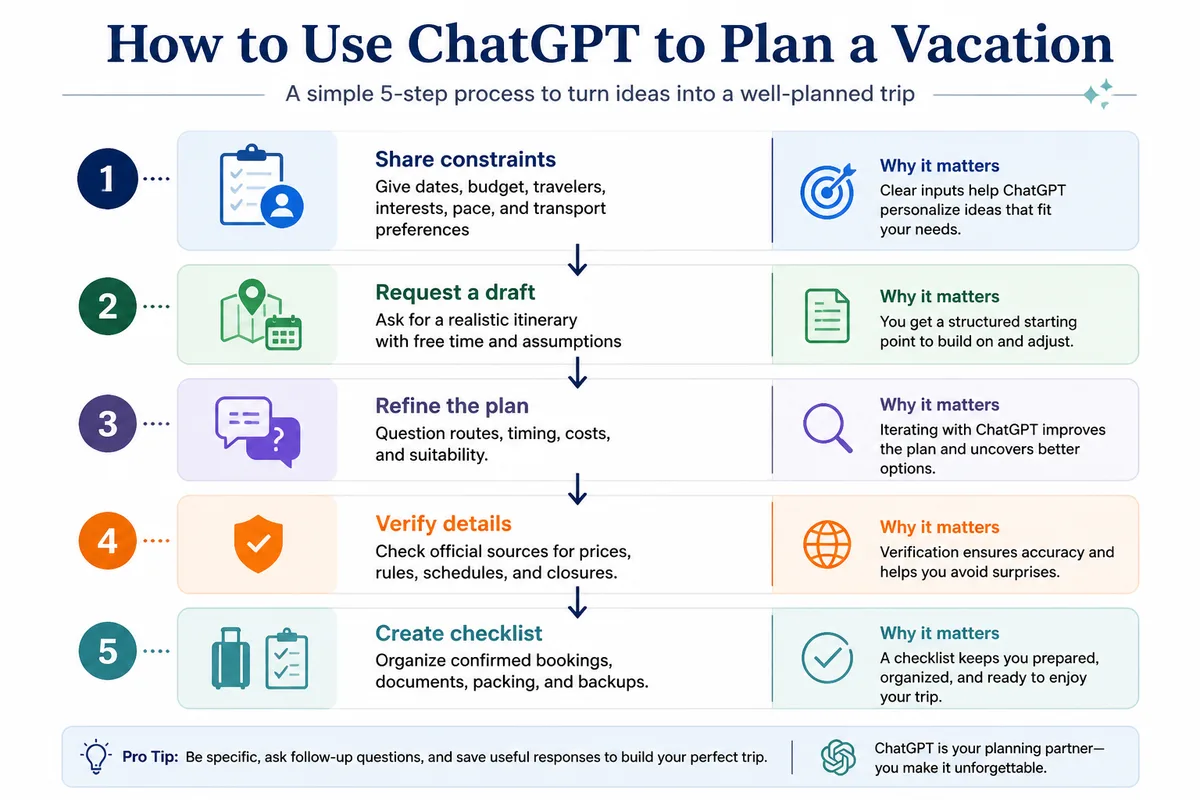
How to use ChatGPT to plan a vacation step by step
The most dependable method is iterative: provide constraints, request a first draft, challenge weak assumptions, refine the schedule, verify changing information, and only then create the final checklist. This process keeps ChatGPT useful without allowing a polished paragraph to disguise an impossible connection, missing reservation, or unsuitable activity.
Step 1: Share your travel constraints
Start with the information that changes the shape of the trip: destination or region, dates, trip length, departure point, travelers, budget, pace, interests, transport preferences, accommodation needs, food restrictions, accessibility requirements, and activities you do not want.
Be concrete about limits.
State what matters most.
Step 2: Ask for a first draft
Request a provisional plan rather than a final booking-ready itinerary, and specify the format you want, such as a table with day, location, activity, estimated travel time, meal idea, rest period, and a backup option for poor weather.
Ask it to flag assumptions.
Do not request certainty.
Step 3: Refine the plan with follow-up prompts
Review the draft critically, then ask ChatGPT to reduce driving, move activities closer together, add rest time, remove unsuitable venues, keep one free afternoon, or offer a lower-cost alternative, because follow-up instructions reveal whether the initial plan actually matches your priorities.
Test the difficult parts.
Look for hidden travel time.
Step 4: Verify every time-sensitive detail
Check flight routes, schedules, prices, availability, attraction hours, event dates, entry requirements, weather, road closures, reservation rules, and cancellation terms with the relevant official or primary source before making a non-refundable commitment.
Verify the route first.
Then verify the costs.
Step 5: Build the final travel checklist
After verification, ask ChatGPT to convert the confirmed information into a departure checklist, a day-by-day schedule, a document list, a packing list, and a backup plan, while marking anything still awaiting confirmation so unresolved details remain visible.
Keep confirmation numbers private.
Print critical information when useful.
- Write down your fixed dates, budget, travelers, and priorities.
- Ask ChatGPT for a draft with realistic free time.
- Question routes, assumptions, costs, and activity suitability.
- Confirm changing details through official or primary sources.
- Save confirmed bookings and create the final checklist.
Useful ChatGPT travel prompts for different trips
Effective ChatGPT travel prompts describe the traveler and the decision, not just the destination. A reusable prompt should ask for assumptions, alternatives, estimated time between activities, budget categories, and facts requiring verification; that structure produces a more useful personalized travel itinerary than a short request for things to do.
A master vacation-planning prompt
Copy and adapt this template:
Help me plan a vacation.

Destination or regions to consider: [location]
Departure point: [city or airport]
Dates or trip length: [dates or number of days]
Travelers: [ages and group size]
Budget: [currency and total or daily limit]
Pace: [slow, moderate, or active]
Interests: [food, museums, beaches, hiking, history, nightlife]
Transport preference: [public transport, rental car, walking, mixed]
Accommodation needs: [location, accessibility, parking, family needs]
Activities to avoid: [list]
Food or medical constraints: [general information only]
Please provide:
1. Three suitable destination or route options
2. A comparison of their main trade-offs
3. A draft itinerary with free time
4. A category-based budget estimate
5. Rainy-day or disruption alternatives
6. A list of facts that must be verified before booking
Prompts for families, road trips, and accessibility
For a family trip, ask for short activity blocks, playgrounds or rest opportunities, child-friendly meal timing, stroller considerations, and one backup activity per day. For a road trip, request driving segments, fuel or charging stops, parking constraints, overnight locations, and a maximum daily driving time.
Accessibility must be specific.
Describe the actual barrier.
Ask whether entrances, toilets, transport, paths, seating, and accommodation features need independent confirmation. ChatGPT can organize your questions, yet only the venue, transport provider, hotel, or official destination source can confirm current accessibility details.
Where ChatGPT falls short in travel planning
ChatGPT can produce fluent, plausible travel advice that contains a wrong date, an unavailable route, a generic recommendation, or a schedule that ignores real movement time. A published travel test reported examples involving incorrect flight assumptions, shifted event dates, and recommendations that did not match the needs of young children, illustrating why confidence in the wording cannot replace verification.
Current prices and availability
ChatGPT may not have current access to hotel inventory, flight prices, reservation calendars, weather warnings, road closures, or transport disruptions. It cannot guarantee the cheapest fare, and it cannot confirm that a suggested room, train, flight, tour, or restaurant still accepts bookings.
Prices move quickly.
Availability disappears.
Outdated or inaccurate details
Travel information changes when venues relocate, routes are suspended, events move dates, entry rules are updated, or businesses change their opening arrangements. A confident answer can therefore become misleading when the prompt concerns a date, fee, schedule, closure, or policy that requires current confirmation.
Check dates independently.
Check names and locations.
Generic recommendations and missing local nuance
Without detailed constraints, ChatGPT may recommend famous attractions that do not suit your mobility, budget, interests, season, group, or available time. Repeated suggestions also deserve scrutiny, because popularity inside an AI-generated answer does not establish that a place is appropriate or currently open.
Specific prompts improve relevance.
They do not create local knowledge.
Unrealistic schedules
An itinerary can look efficient on paper while failing in practice because it underestimates airport procedures, transfers, parking, queues, hills, weather, meal breaks, children’s needs, or the time required to return to accommodation.
Travel time is part of sightseeing.
Protect the margin.
Do not book from the draft alone.
How to fact-check a ChatGPT vacation plan
Verification should follow the order in which an error would cause the greatest disruption: getting there, entering the country, finding a place to sleep, reaching activities, and paying the actual cost. Use airline and transport websites for schedules, government sources for entry rules, official venues for closures, and accommodation providers for booking terms.

Start with non-refundable items.
Record the date checked.
| Detail | Where to verify | What to confirm |
|---|---|---|
| Flights and trains | Airline or transport operator | Route, date, duration, connection, baggage, and disruption rules |
| Entry requirements | Government or consular website | Passport validity, visa rules, permits, and health requirements |
| Accommodation | Property or booking provider | Availability, total price, taxes, cancellation, access, and check-in |
| Attractions and events | Official venue or organizer | Opening date, hours, tickets, age rules, and closures |
| Road conditions | Transport authority or local authority | Closures, weather restrictions, tolls, parking, and seasonal access |
Keep screenshots or confirmation emails for paid reservations, and compare the final price with the generated estimate rather than trying to make the booking match the original draft. For complex international travel, official government guidance should take priority over an AI answer, especially for immigration, insurance, health, and safety decisions.
ChatGPT versus booking websites, maps, and travel agents
ChatGPT is strongest during brainstorming, comparison, drafting, and organization; booking websites are stronger for live inventory and payment; mapping tools are stronger for current routing and distances; and a travel professional may be more useful for complex, high-cost, multi-stop, or accessibility-sensitive trips where human judgment and supplier coordination matter.
| Tool | Best use | Do not rely on it for |
|---|---|---|
| ChatGPT | Ideas, comparisons, prompts, drafts, lists, and organization | Confirmed prices, availability, bookings, or official rules |
| Booking platforms | Current inventory, prices, reservations, and cancellation terms | Personalized judgment about the entire trip |
| Maps and transport apps | Routes, distances, navigation, and current movement information | Complete destination research or cultural context |
| Travel professional | Complex arrangements, specialist needs, and supplier coordination | Every low-cost independent trip by default |
Choose ChatGPT for early planning.
Choose a booking platform for reservations.
For a first trip, using a structured external resource alongside AI may reduce decision fatigue; this article on planning your first trip addresses the organizational side without treating one tool as sufficient for every stage.
Common mistakes when using ChatGPT for travel
The most expensive mistakes come from confusing a useful draft with a confirmed plan. They include vague prompts, accepting every recommendation, packing too many activities into one day, copying unverified prices, and sharing personal booking information that the tool does not need.
Vague input creates generic output.
Unverified detail creates booking risk.
- Asking for a perfect vacation in one sentence: the answer lacks the constraints that shape a realistic trip. Add budget, dates, pace, interests, travelers, and exclusions.
- Trusting a plausible flight or train route: a natural-sounding connection may not exist. Check the operator’s current timetable before building accommodation around it.
- Filling every day with attractions: queues, transfers, meals, weather, and fatigue consume time. Request free periods and backup options.
- Using generated prices as a final budget: estimates can omit taxes, baggage, deposits, transfers, and seasonal changes. Replace them with current quoted totals.
- Sharing sensitive information: passport numbers, booking codes, payment data, and home addresses add exposure without improving the itinerary. Use general descriptions instead.
If planning errors are already causing delays or unnecessary spending, review these common trip-planning mistakes before refining the AI-generated schedule.
Privacy and safety when using ChatGPT for travel
Travel planning usually requires preferences, not identity documents. Give ChatGPT the minimum information needed to organize the trip, avoid entering passport or payment details, and treat medical, immigration, insurance, and safety questions as prompts for official guidance rather than areas where an AI response can make the final decision.
Use broad personal details.
Keep booking data private.
For health-related travel needs, consult an appropriate qualified professional and official public-health guidance; for entry requirements, use the destination government or consular authority. ChatGPT can help turn verified advice into a checklist, which is a safer role than asking it to decide whether you may enter a country or whether a medical risk is acceptable.
Final verdict: can ChatGPT plan your vacation?
Can ChatGPT plan a vacation? Yes, it can accelerate destination research, compare options, organize a budget, draft a personalized itinerary, and prepare practical lists. It should not independently finalize your trip because current schedules, prices, availability, entry rules, closures, weather, and local suitability must be checked elsewhere.
Use it early and iteratively.
Verify before paying.
ChatGPT is worth using when you need structure, alternatives, or a fast first draft; it is the wrong final authority for live travel facts and formal requirements. The strongest workflow combines AI for organization with official sources and booking providers for confirmation.